// Editor Eye LP — Section components

// ============================================
// Nav
// ============================================
function Nav({ lang, setLang, t }) {
  const [scrolled, setScrolled] = React.useState(false);
  const FALLBACK_URL = "https://downloads.editor-eye.app/extension/v0.18.7/editor-eye-unity-v0.18.7.unitypackage";
  const [downloadUrl, setDownloadUrl] = React.useState(FALLBACK_URL);
  React.useEffect(() => {
    const onScroll = () => setScrolled(window.scrollY > 8);
    window.addEventListener("scroll", onScroll);
    return () => window.removeEventListener("scroll", onScroll);
  }, []);
  React.useEffect(() => {
    fetch("https://downloads.editor-eye.app/extension/manifest.json")
      .then(r => r.json())
      .then(m => { if (m.download_url) setDownloadUrl(m.download_url); })
      .catch(() => {});
  }, []);
  return (
    <nav style={{
      position: "sticky", top: 0, zIndex: 50,
      background: scrolled ? "rgba(255,255,255,0.85)" : "transparent",
      backdropFilter: scrolled ? "blur(12px)" : "none",
      borderBottom: scrolled ? "1px solid var(--rule)" : "1px solid transparent",
      transition: "background .2s, border-color .2s, backdrop-filter .2s"
    }}>
      <div className="container" style={{ display: "flex", alignItems: "center", justifyContent: "space-between", height: 68 }}>
        <a href="#top" style={{ display: "inline-flex", alignItems: "center", gap: 10 }}>
          <Logo size={22} />
        </a>
        <div style={{ display: "flex", alignItems: "center", gap: 4 }} className="nav-center">
          <a href="#features" className="btn btn-quiet">{t.nav.features}</a>
          <a href="#pricing" className="btn btn-quiet">{t.nav.pricing}</a>
          <a href="#faq" className="btn btn-quiet">{t.nav.faq}</a>
          <a href={downloadUrl} download className="btn btn-cta btn-cta-sm">{t.nav.docs}</a>
        </div>
        <div style={{ display: "flex", alignItems: "center", gap: 10 }}>
          <div role="group" aria-label="Language" style={{
            display: "inline-flex", padding: 3, borderRadius: 999,
            background: "var(--bg-tint)", border: "1px solid var(--rule)"
          }}>
            {["ja","en"].map(code => (
              <button key={code} onClick={() => setLang(code)} style={{
                padding: "5px 12px", borderRadius: 999, border: 0,
                background: lang === code ? "var(--bg)" : "transparent",
                color: lang === code ? "var(--ink)" : "var(--ink-3)",
                fontSize: 12, fontWeight: 600, fontFamily: "var(--font-mono)",
                letterSpacing: "0.06em",
                boxShadow: lang === code ? "var(--shadow-1)" : "none"
              }}>{code.toUpperCase()}</button>
            ))}
          </div>
          <a href="/signup" className="btn btn-quiet" style={{ display: "var(--hide-mobile, inline-flex)" }}>{t.nav.login}</a>
          <a href="/signup" className="btn btn-cta btn-cta-sm">{t.nav.cta}</a>
        </div>
      </div>
    </nav>
  );
}
window.Nav = Nav;

// ============================================
// Hero
// ============================================
function HeroVideoMock({ t, lang }) {
  // Simulated demo: terminal-style prompt → VFX nodes assemble
  const [step, setStep] = React.useState(0);
  React.useEffect(() => {
    const id = setInterval(() => setStep(s => (s + 1) % 5), 1800);
    return () => clearInterval(id);
  }, []);
  const promptJa = "プレイヤーを追いかける炎を出して、衝突したら爆発させて";
  const promptEn = "Create flames that chase the player and explode on impact";
  const prompt = lang === "ja" ? promptJa : promptEn;

  const nodes = [
    { x: 6, y: 18, label: "Spawn", color: "var(--blue)" },
    { x: 32, y: 12, label: "Initialize", color: "var(--blue)" },
    { x: 32, y: 44, label: "Update", color: "var(--blue)" },
    { x: 60, y: 22, label: "Output", color: "var(--orange)" },
    { x: 76, y: 56, label: "Output", color: "var(--orange)" }
  ];

  return (
    <div style={{
      position: "relative",
      borderRadius: 12,
      background: "var(--bg)",
      border: "1px solid var(--rule-2)",
      boxShadow: "var(--shadow-3)",
      overflow: "hidden"
    }}>
      {/* Window chrome */}
      <div style={{
        height: 36, background: "var(--bg-tint)", borderBottom: "1px solid var(--rule)",
        display: "flex", alignItems: "center", padding: "0 12px", gap: 8
      }}>
        <span style={{ width: 10, height: 10, borderRadius: "50%", background: "#FF5F57" }} />
        <span style={{ width: 10, height: 10, borderRadius: "50%", background: "#FEBC2E" }} />
        <span style={{ width: 10, height: 10, borderRadius: "50%", background: "#28C840" }} />
        <div style={{
          flex: 1, textAlign: "center", fontFamily: "var(--font-mono)",
          fontSize: 11, color: "var(--ink-3)", letterSpacing: "0.04em"
        }}>
          Unity · MyGame.unity — Editor Eye
        </div>
      </div>

      {/* Mock body */}
      <div style={{ display: "grid", gridTemplateColumns: "1.05fr 1fr", minHeight: 360 }}>
        {/* Left: chat */}
        <div style={{ padding: 18, borderRight: "1px solid var(--rule)", background: "var(--bg-soft)" }}>
          <div style={{ display: "flex", alignItems: "center", gap: 8, marginBottom: 14 }}>
            <span className="tag tag-blue">▍ Editor Eye</span>
            <span className="tag mono">VFX Graph · Script · Scene</span>
          </div>
          <div style={{
            background: "var(--bg)", border: "1px solid var(--rule)",
            borderRadius: 10, padding: "12px 14px",
            fontSize: 14, lineHeight: 1.5, marginBottom: 12
          }}>
            <div style={{ fontFamily: "var(--font-mono)", fontSize: 10, color: "var(--ink-3)", marginBottom: 4, letterSpacing: "0.06em" }}>YOU · {lang === "ja" ? "あなた" : "You"}</div>
            <span className="cursor">{prompt}</span>
          </div>
          <div style={{ display: "grid", gap: 8 }}>
            {[
              { ok: step >= 1, label: lang === "ja" ? "VFX Graph を構築中…" : "Building VFX Graph…", n: "12 nodes" },
              { ok: step >= 2, label: lang === "ja" ? "FollowPlayer.cs を生成" : "Generating FollowPlayer.cs", n: "32 lines" },
              { ok: step >= 3, label: lang === "ja" ? "OnCollisionExplode.cs を生成" : "Generating OnCollisionExplode.cs", n: "21 lines" },
              { ok: step >= 4, label: lang === "ja" ? "Scene に配置・Play 開始" : "Placing in Scene · Play started", n: "✓" }
            ].map((s, i) => (
              <div key={i} style={{
                display: "flex", alignItems: "center", justifyContent: "space-between",
                padding: "8px 12px", borderRadius: 8,
                background: s.ok ? "var(--blue-soft)" : "var(--bg-tint)",
                border: "1px solid var(--rule)",
                opacity: s.ok ? 1 : 0.55,
                transition: "all .3s"
              }}>
                <span style={{ display: "flex", alignItems: "center", gap: 8, fontSize: 13, color: s.ok ? "var(--blue)" : "var(--ink-3)" }}>
                  <span style={{
                    width: 14, height: 14, borderRadius: "50%",
                    background: s.ok ? "var(--blue)" : "transparent",
                    border: s.ok ? "0" : "1.5px dashed var(--ink-4)",
                    display: "inline-flex", alignItems: "center", justifyContent: "center",
                    color: "#fff", fontSize: 9
                  }}>{s.ok ? "✓" : ""}</span>
                  <span style={{ fontWeight: 500 }}>{s.label}</span>
                </span>
                <span className="mono" style={{ fontSize: 10.5, color: "var(--ink-3)" }}>{s.n}</span>
              </div>
            ))}
          </div>
        </div>

        {/* Right: VFX graph */}
        <div style={{ position: "relative", background: "linear-gradient(180deg, #1A1F28 0%, #0E1116 100%)", overflow: "hidden" }}>
          {/* grid */}
          <div style={{
            position: "absolute", inset: 0,
            backgroundImage: "linear-gradient(rgba(255,255,255,0.04) 1px, transparent 1px), linear-gradient(90deg, rgba(255,255,255,0.04) 1px, transparent 1px)",
            backgroundSize: "24px 24px"
          }}/>
          {/* edges */}
          <svg viewBox="0 0 100 70" preserveAspectRatio="none" style={{ position: "absolute", inset: 0, width: "100%", height: "100%" }}>
            {[
              [12, 22, 32, 16],
              [12, 22, 32, 48],
              [40, 16, 60, 26],
              [40, 48, 76, 60]
            ].map(([x1,y1,x2,y2], i) => (
              <path key={i}
                d={`M ${x1} ${y1} C ${(x1+x2)/2} ${y1}, ${(x1+x2)/2} ${y2}, ${x2} ${y2}`}
                fill="none"
                stroke={step >= 1 ? "rgba(245,130,31,0.7)" : "rgba(255,255,255,0.1)"}
                strokeWidth="0.4"
                style={{ transition: "stroke .4s" }}
              />
            ))}
          </svg>
          {/* nodes */}
          {nodes.map((n, i) => (
            <div key={i} style={{
              position: "absolute",
              left: `${n.x}%`, top: `${n.y}%`,
              padding: "5px 10px",
              background: step >= 1 ? "rgba(255,255,255,0.08)" : "rgba(255,255,255,0.02)",
              border: `1px solid ${step >= 1 ? n.color : "rgba(255,255,255,0.1)"}`,
              borderRadius: 6,
              fontFamily: "var(--font-mono)", fontSize: 10, color: "#fff",
              backdropFilter: "blur(6px)",
              opacity: step >= 1 ? 1 : 0.4,
              transition: "all .4s",
              transitionDelay: `${i * 80}ms`,
              transform: step >= 1 ? "translateY(0)" : "translateY(4px)"
            }}>
              <span style={{ display: "inline-block", width: 6, height: 6, borderRadius: "50%", background: n.color, marginRight: 6, verticalAlign: "middle" }}/>
              {n.label}
            </div>
          ))}
          {/* timer overlay */}
          <div style={{
            position: "absolute", right: 14, bottom: 14,
            padding: "6px 10px", borderRadius: 999,
            background: "rgba(245,130,31,0.18)", border: "1px solid rgba(245,130,31,0.4)",
            color: "var(--orange)", fontFamily: "var(--font-mono)", fontSize: 11, fontWeight: 600,
            letterSpacing: "0.06em"
          }}>
            ⏱ 5:00 → 0:04
          </div>
        </div>
      </div>
    </div>
  );
}
window.HeroVideoMock = HeroVideoMock;

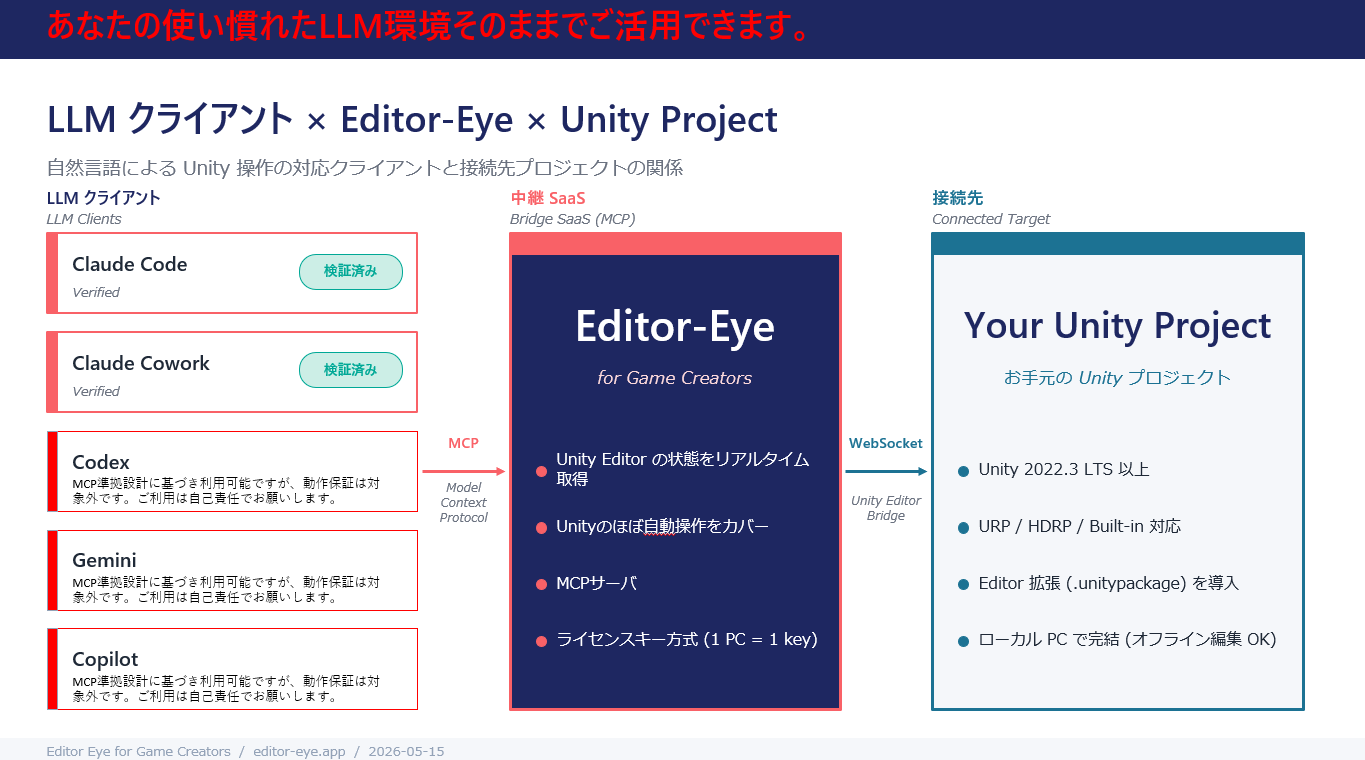
function ArchDiagram({ t }) {
  return (
    <div style={{ borderRadius: 12, overflow: "hidden", border: "1px solid var(--rule)", boxShadow: "var(--shadow-1)" }}>
      <img
        src="/screenshots/arch01.png"
        alt="Editor Eye architecture — LLM clients → Editor-Eye → Your Unity Project"
        style={{ width: "100%", height: "auto", display: "block" }}
        loading="eager"
      />
    </div>
  );
}
window.ArchDiagram = ArchDiagram;

function Hero({ t, lang, showArch }) {
  return (
    <section id="top" className="section hero-dark" style={{ paddingTop: 96, paddingBottom: 120 }}>
      <div className="container">
        <div style={{ display: "grid", gridTemplateColumns: "1fr", gap: 64 }}>
          <div className="reveal">
            <span className="tag tag-blue" style={{ marginBottom: 18 }}>{t.hero.tag}</span>
            <h1 className="h-display" style={{ fontSize: "clamp(48px, 7vw, 96px)", fontWeight: 900, letterSpacing: "-0.035em", margin: "16px 0 22px" }}>
              {t.hero.title}
            </h1>
            <p style={{ fontSize: "clamp(18px, 1.8vw, 22px)", color: "rgba(245,244,238,0.85)", margin: "0 0 12px", maxWidth: 760, lineHeight: 1.45, fontWeight: 500 }}>
              {t.hero.subtitle}
            </p>
            <p style={{ fontSize: 16, color: "rgba(245,244,238,0.6)", margin: "0 0 32px", maxWidth: 720 }}>
              {t.hero.sub}
            </p>
            <div style={{ display: "flex", alignItems: "center", gap: 14, flexWrap: "wrap", marginBottom: 22 }}>
              <a href="/signup" className="btn btn-cta" style={{ padding: "16px 28px", fontSize: 16 }}>{t.hero.cta}</a>
              <a href="#demo" className="btn btn-quiet" style={{ fontFamily: "var(--font-mono)", fontSize: 13, letterSpacing: "0.04em" }}>
                {t.hero.secondary}
              </a>
            </div>
            <div style={{ display: "flex", gap: 24, flexWrap: "wrap", color: "rgba(245,244,238,0.55)", fontSize: 12.5, fontFamily: "var(--font-mono)", letterSpacing: "0.04em" }}>
              {t.hero.meta.map((m, i) => (
                <span key={i} style={{ display: "inline-flex", alignItems: "center", gap: 6 }}>
                  <span className="hero-meta-dot" style={{ width: 5, height: 5, borderRadius: "50%", background: "var(--blue)" }}/> {m}
                </span>
              ))}
            </div>
          </div>

          <div id="demo" className="reveal" style={{ display: "grid", gridTemplateColumns: "1fr", gap: 20, alignItems: "start" }}>
            {t.hero.videoSrc ? (
              <div style={{ borderRadius: 12, overflow: "hidden", border: "1px solid var(--rule-2)", boxShadow: "var(--shadow-3)" }}>
                {/youtube\.com\/embed\/|youtu\.be\//i.test(t.hero.videoSrc) ? (
                  <div style={{ position: "relative", width: "100%", aspectRatio: "16 / 9" }}>
                    <iframe
                      src={t.hero.videoSrc}
                      title="Editor Eye demo"
                      style={{ position: "absolute", inset: 0, width: "100%", height: "100%", border: 0, display: "block" }}
                      allow="accelerometer; autoplay; clipboard-write; encrypted-media; gyroscope; picture-in-picture; web-share"
                      allowFullScreen
                      loading="eager"
                    />
                  </div>
                ) : /\.(mp4|webm)$/i.test(t.hero.videoSrc) ? (
                  <video
                    src={t.hero.videoSrc}
                    autoPlay
                    loop
                    muted
                    playsInline
                    preload="metadata"
                    style={{ width: "100%", display: "block", objectFit: "cover" }}
                    aria-label="Editor Eye demo"
                  />
                ) : (
                  <img src={t.hero.videoSrc} alt="Editor Eye demo" style={{ width: "100%", display: "block", objectFit: "cover" }} loading="eager" />
                )}
              </div>
            ) : (
              <HeroVideoMock t={t} lang={lang} />
            )}
            {showArch && (
              <div style={{ display: "grid", gap: 14 }}>
                <ArchDiagram t={t} lang={lang} />
              </div>
            )}
          </div>
        </div>
      </div>
    </section>
  );
}
window.Hero = Hero;

// ============================================
// Villain (3 reasons stuck in Unity)
// ============================================
function VillainSection({ t, lang }) {
  return (
    <section id="problem" className="section section-rule section-dark">
      <div className="container">
        <div className="reveal" style={{ marginBottom: 56 }}>
          <h2 className="h-section h-mega" style={{ margin: "12px 0 0", textWrap: "balance" }}>
            {t.villain.title}
          </h2>
        </div>

        <div style={{ display: "grid", gridTemplateColumns: "repeat(3, 1fr)", gap: 20 }} className="villain-grid">
          {t.villain.cards.map((v, i) => (
            <article key={i} className="reveal" style={{
              padding: 28,
              background: "var(--bg)",
              borderRadius: 14,
              border: "1px solid var(--rule)",
              transitionDelay: `${i * 0.1}s`
            }}>
              {v.art ? (
                <div style={{ borderRadius: 8, overflow: "hidden", border: "1px solid var(--rule)" }}>
                  <img src={v.art} alt={v.role} style={{ width: "100%", height: 150, objectFit: "cover", display: "block" }} loading="lazy" />
                </div>
              ) : (
                <PlaceholderArt label={`Illustration · ${v.role.replace(/[①②③]/g, "").trim()}`} mood="villain" height={150} />
              )}
              <h3 style={{ fontSize: 20, fontWeight: 700, margin: "20px 0 8px", letterSpacing: "-0.015em" }}>{v.title}</h3>
              <p style={{ color: "var(--ink-3)", fontSize: 14.5, margin: 0, lineHeight: 1.6 }}>{v.body}</p>
            </article>
          ))}
        </div>

        {/* Bridge to next section */}
        <div className="reveal" style={{ marginTop: 64, textAlign: "center" }}>
          <p className="h-section" style={{ fontSize: "clamp(28px,3.6vw,42px)", color: "#FFFFFF", margin: 0, fontWeight: 700, letterSpacing: "-0.02em" }}>
            {lang === "ja" ? "では、どう解決するのか？" : "So how do we solve it?"}
          </p>
          <div style={{
            marginTop: 14, fontSize: 28, color: "var(--orange)",
            animation: "bounce-down 1.6s ease-in-out infinite"
          }}>↓</div>
          <style>{`@keyframes bounce-down { 0%,100% { transform: translateY(0); } 50% { transform: translateY(8px); } }`}</style>
        </div>
      </div>
      <style>{`
        @media (max-width: 880px) { .villain-grid { grid-template-columns: 1fr !important; } }
      `}</style>
    </section>
  );
}
window.VillainSection = VillainSection;

// ============================================
// Solution (3 things Editor Eye solves)
// ============================================
function SolutionSection({ t, lang }) {
  return (
    <section id="solution" className="section section-rule">
      <div className="container">
        <div className="reveal" style={{ marginBottom: 56 }}>
          <h2 className="h-section h-mega" style={{ margin: "12px 0 0", textWrap: "balance" }}>
            {lang === "ja" ? (
              <>次に、Editor Eye で<span className="kw-underline">解決</span>できること。</>
            ) : (
              <>Next, what Editor Eye can <span className="kw-underline">solve</span>.</>
            )}
          </h2>
        </div>

        <div style={{ display: "grid", gridTemplateColumns: "repeat(3, 1fr)", gap: 20 }} className="solution-grid">
          {t.solution.cards.map((s, i) => (
            <article key={i} style={{
              padding: 28,
              background: "linear-gradient(180deg, var(--bg) 0%, var(--blue-soft) 280%)",
              borderRadius: 14,
              border: "1px solid var(--rule)"
            }}>
              <div style={{ display: "flex", justifyContent: "space-between", alignItems: "baseline", marginBottom: 18 }}>
                <span className="tag tag-blue">{s.role}</span>
                <span className="mono" style={{ color: "var(--blue)", fontSize: 28, fontWeight: 700, opacity: 0.5 }}>{s.n}</span>
              </div>
              {s.art ? (
                <div style={{ borderRadius: 8, overflow: "hidden", border: "1px solid var(--rule)", marginBottom: 0 }}>
                  <img src={s.art} alt={s.role} style={{ width: "100%", height: 150, objectFit: "cover", display: "block" }} loading="lazy" />
                </div>
              ) : (
                <PlaceholderArt label={`Illustration · ${s.role.replace(/[①②③]/g, "").trim()}`} mood="solution" height={150} />
              )}
              <h3 style={{ fontSize: 20, fontWeight: 700, margin: "20px 0 8px", letterSpacing: "-0.015em", color: "var(--coral, #E03131)" }}>{s.title}</h3>
              <p style={{ color: "var(--ink-2)", fontSize: 14.5, margin: 0, lineHeight: 1.6 }}>{s.body}</p>
            </article>
          ))}
        </div>

        <div style={{ marginTop: 56, textAlign: "center" }}>
          <a href="/signup" className="btn btn-cta" style={{ padding: "16px 28px", fontSize: 16 }}>{t.hero.cta}</a>
        </div>
      </div>
      <style>{`
        @media (max-width: 880px) { .solution-grid { grid-template-columns: 1fr !important; } }
      `}</style>
    </section>
  );
}
window.SolutionSection = SolutionSection;

// ============================================
// Backwards-compatible wrapper (kept for app.jsx import)
// ============================================
function VillainSolution({ t, lang }) {
  return (
    <>
      <VillainSection t={t} lang={lang} />
      <SolutionSection t={t} lang={lang} />
    </>
  );
}
window.VillainSolution = VillainSolution;

// (legacy stripped)